TL:DR – Raspberry Pi Zero + Cheap Ethernet Adapter = 4Mbit/s, Raspberry Pi 3B Ethernet = 82Mbit/s, Don’t trust router USB ports and no one seems to make an easy off the shelf tool for measuring your home broadband speed.
Warning if you have been reading my other posts and are not technically minded/interested in tech this post probably isn’t for you and you might want to skip it.
High Wycombe is in that wonderful belt to the west of London where all the tech companies are based, thus, despite the dull grey colour that you would use to describe High Wycombe to a visitor it is expensive to live here. It is actually in terms of quality vs cost worse than west London in my opinion, I can only assume it is because just five minutes north/west of High Wycombe you will find the beautiful Chiltern hills. Because of this & despite earning what I would deem a reasonable wage, I have no hope of ever owning a house in this area and chose to live in an average House of Multiple Occupancy (HMO).
HMO’s appear to be abundant in this area and all have the same downsides as far as I can tell, no matter how good the pictures look; kitchen to small, no communal area’s other than the kitchen, mould issues and having to pay for the washing machine and tumble dryer in coins!
However I digress, back in September the old company that managed at the property I live in decided that the BT Broadband that had been struggling to give a consistent 20Mbit/s would be replaced by a Virgin Media Business connection. This was excellent however when they did install it they failed to take into account the size of the house and existing network architecture, which has lead to some issues.
The most notable is that the Virgin Media router/modem was installed in the kitchen, in the middle of the house, as a HMO every door is a fire door and has an auto closer on it. In addition to this the there is no physical connection from the Router to the CAT5E ports in all the rooms. Resulting in my NAS and some other equipment became dark, the 5GHz struggling to make it out of the kitchen and the 2.4GHz is taking the majority of the load barely reaching the other housemates at the back of the house.
In addition to the wireless coverage within the house being troublesome, we have been seen serious dropouts in incoming speed, where at time I have struggled to get 1MB/s download speed. This lead me to wondering how can I help the new management company that took over in December sort out these issues and get the right information to them to pass to Virgin.
I wanted to measure the speed coming into the building because we already know how to fix the Wifi and Ethernet connection issues. Thus to take the variance of WIFI performance out of the speed measurement I figured the best approach was to measure using a device connected directly to the ethernet of the Router.
Approach 1 – Raspberry Pi Zero with USB Ethernet Adapter

A quick google found that there was a library for interfacing with Speedtest.net’s CLI, and that this could be easily set up on a Raspberry pi. The logic behind choosing a zero and ethernet adapter was thus:
- A Raspberry Pi Zero + Ethernet Adapter were cheap ~ £10
- I didn’t need a display out on it so why the low processing power
- Low power draw meant I could likely power it from the USB port on the router.
A side bonus that I had found in looking at the articles for what I wanted to do was that I had found a new way to talk / setup a pi headless. I have been playing with Pi’s for a couple of years and had never realised you could use a USB to Serial adapter to connect direct and get the terminal over serial. So I ordered a USB to Serial adapter to go with the Pi Zero and Cheap Ethernet to Micro USB Adapter.
Once they had all arrived it only took me a couple of hours to get it set up and logging to a csv, this is where I realised my failings:
- The cheap Micro USB to Ethernet Adapter was despite being advertised as USB 2 only really USB 1.1 and the maximum speed I could measure over it was about 4Mbit/s. Googling the chipset found plenty of article explaining and giving realistic speed achievable with other chipsets / dongles. A maximum on the Pi Zero being Pimoroni’s adapter (out of stock) @ 96Mbit/s
- The USB port on the back of the router seemed to supply no power what so ever and therefore I still needed a power brick plugged in somewhere to supply power to the Pi.
So quickly adapting to over come this I moved to a second approach.
Approach 2 – Raspberry Pi 3B
I remembered that I had a Raspberry Pi 3B not currently in use and that this has a proper ethernet port built on and thus maybe this would be a better solution, this was surprisingly easy to set up as I was able to just move the MicroSD card from the Zero and dig out the correct PSU and away I went. The new measurement system was up and running.
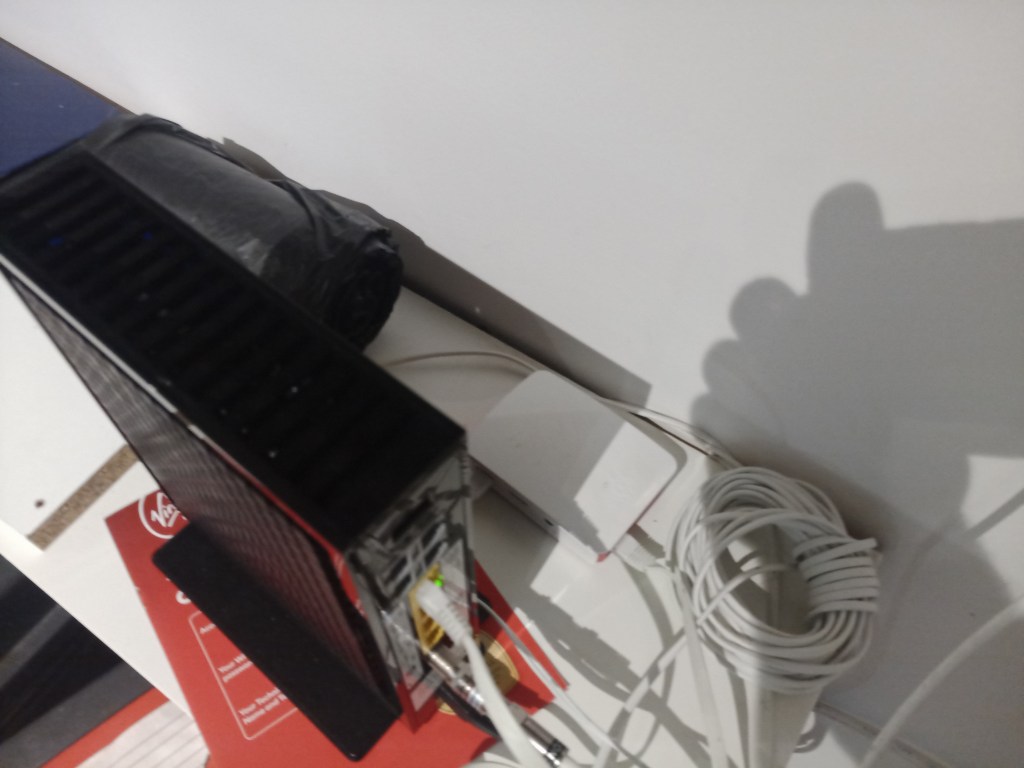
I then did some tweaks for how often it was measuring and how I would access the data setting up the CSV in an Apple Share so that it was easily accessible from my MacBook on the WLAN.
The internet wasn’t running at full pelt when I set it up and Virgin had admitted to doing engineering work explaining that there may be network speed issues. Thus I have left it running this last week, below is the headline figures (It’s wouldn’t let me attache the raw CSV or TXT).
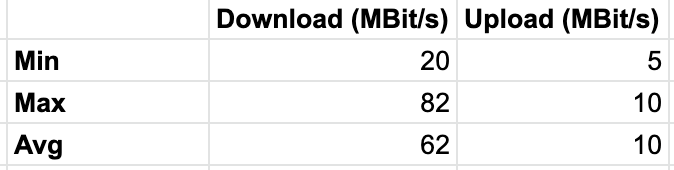
What’s interesting about this is that the max speed I was able to measure was 82Mbit/s, theoretically the Ethernet on the RPi 3B is 100Mbit/s capable. Now I knew from searching the web whilst having the issue with the Zero that it was unlikely I would get the full 100 but I was hoping to get 96Mbit/s.
This solution at least for now tells me enough to know when Virgin are really struggling to give the 150Mbit/s plus that I suspect is being paid for, the Median currently being 64Mbit/s and there often being times when it is down in the 40’s. However it would not show me issues/performance above the 82Mbit/s which does skew my data.
Approach 3?
Thinking about what a solution to this would look like… This evening I sat in the kitchen and did a speed test from my phone connected to the 5GHz wireless and got speeds in excess of 250Mbit/s. Which is firstly crazy but secondly made me think how common speed monitoring issues must be for several reasons:
- Most people when checking speed are using the available device, there phone maybe there laptop and most likely wireless either 2.4GHz or increasingly 5GHz.
- In a modern house the number of wireless devices can greatly change / the load can vary.
- You are reliant on using third party servers to test your speed, Speedtest.net or Google or others.
- In most cases there is no direct utility built onto the router to check internet speed or log it.
This last one is in some circumstances becoming not true, from my own personal experience I have installed Google Wifi in another house and that itself performs daily checks on the speed being received. But that is over £300 of routers… Given that most ISP’s in the UK are now making some form of Ofcom based promise on their performance it would seem logical to me that they would want to make it easier to be clear on the speed to a given house.
I also spent a few minutes looking for solutions to see if anyone had developed a product for this specific purpose, a small device that you plugged into the back of your router. That say ran a little web server and you could go to it’s address on your local network or an online page and see your speeds plotted over time, something like this that was sub £50 would be worthwhile in a lot of situations especially when dealing with ISP’s failing to meet their promises.
However I could not see any such solutions, in fact I came back round to cheapest / easiest solution to get up to 300MBit/s being another Raspberry PI. If I had for instance the RPi 3B+ it would have 5GHz wifi & Gigabit Ethernet which would enable measuring speeds up to 300MBit/s, it is still hampered by the USB bus being used to connect the ethernet. Or a RPi 4 which has 5GHz wifi and a Gigabit ethernet, reports say it is capable of around 900MBit/s on a wired connection.
Other than this my only other method (once the Ethernet port in my room is back alive) is a gigabit ethernet port on one of my desktop machines, though this is a power hungry and wasteful way to measure the speed of the internet in a house…
Final Thought
The QA Engineer in me looks at my approach and identifies these key areas where I failed to correctly come up with the requirements and look at the details for what I wanted to achieve.
- What is the Value you are expecting to measure and why?
- In order to measure something you must first have a measurement device that can exceed the value you are expecting to measure.
- Always consider a system or flow diagram down to the lowest level you can with the knowledge you have
- Everybody / Everthing lies
If I had thought further about items I could have identified that I needed to measure up to ~ 300MBit/s that a raspberry pi zero wouldn’t be able to nor would any of the hardware I have laying about (except a full size computer). By considering the flow diagram I might have noted the possibility for the USB bus to being a limiting factor in the architecture of the test hardware. Finally if I had followed Dr Gregory House’s golden rule I wouldn’t have trust the listing for the USB to Ethernet adapter…
 LazyModernTraveler